Intro to Audio in Unreal Engine 5
Intro to Audio in UE5
Intro
This is an introductory guide covering the tools and features available in the UE5 audio stack. It is primarily aimed at audio practitioners coming from another toolset, such as Wwise.
This is more of a guide than a rulebook. In my opinion, UE5 offers a more flexible approach to audio than middleware. This is a double-edged sword. In many cases, the fact that you can do something often means that you have to.
Unreal Engine Overview
Starting with a Hello World style example - if you drag a SoundWave asset into your level and press the play icon to start PIE (Play In Editor), you should hear that SoundWave playing. UE has done a few things: it has created an Actor, attached an Audio Component to it, set its Sound to the SoundWave we dragged in, and started playback due to its Auto Activate setting being ticked. These pieces are fundamental, so let’s break them down.
Actors are objects that can be placed in the level. Modular functionality can be added to Actors by attaching Scene Components and Actor Components. The key distinction between the two is: Scene Components have a Transform and Actor Components do not. Transforms are just a set of values that define the location, rotation, and scale of an object. So Actors exist at some location in the level, and Scene Components exist at some location on the Actor. Actor Components just house logic (and thus have less overhead).
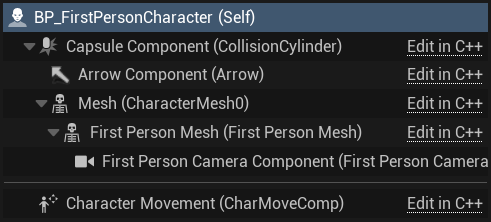 Hierarchy showing a Character Actor with various Scene Components as well as an Actor Component (shown under the separator).
Audio Components
Audio Components are of the Scene Component variety - an important point, as it’s the Transform that allows us to process 3D audio. Adding an Audio Component to an Actor is simple 🡢 click the Add button in the Components Tab and select Audio. By dragging the Audio Component into Event Graph, and then dragging from its output pin, we can see a bunch of actions we can perform on it.
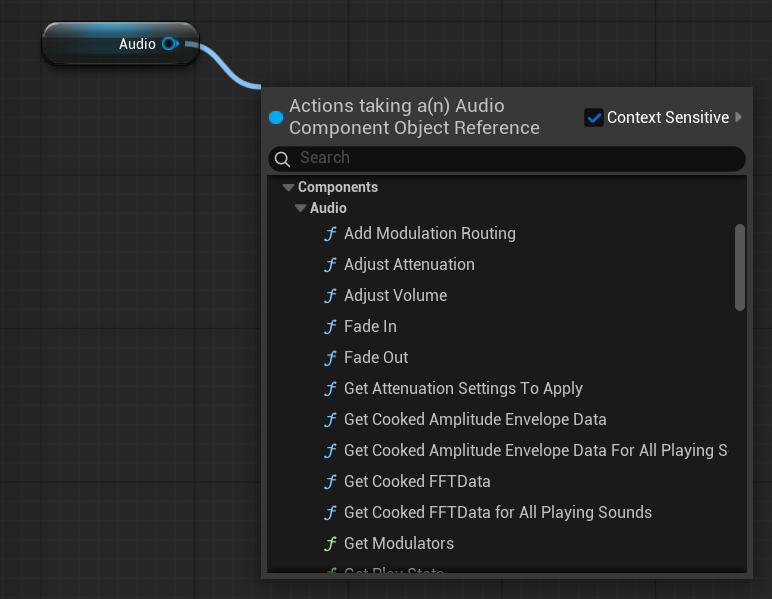 A small selection of Actions that can be Audio Component .
There are many cases, however, where we need to play audio from within a Component rather than directly on an Actor. And to note, we cannot add Components to Components as we can to Actors. Fortunately, there are countless ways to achieve this, but to keep things simple - let’s look at dynamically spawning an Audio Component.
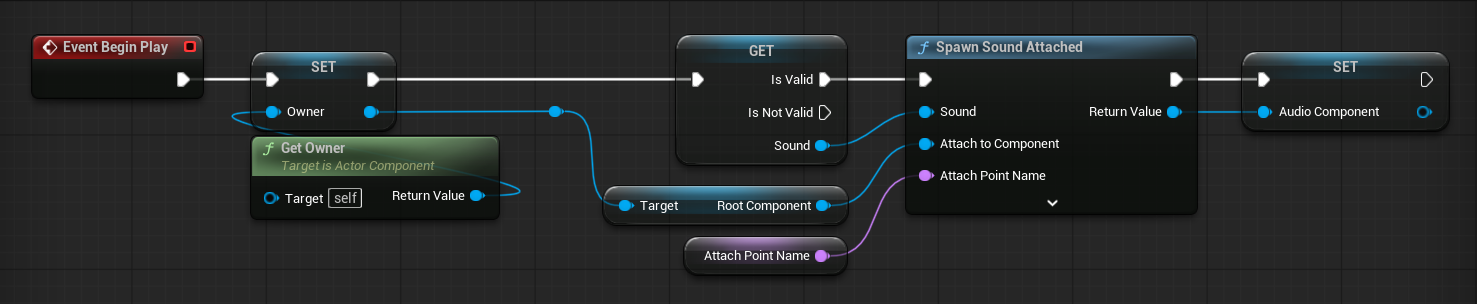 Spawning and caching an Audio Component. This approach assumes we want to to play sound on an Actor from within one of its Components. The owning Actor can be retrieved using the Get Owner node.
Blueprints
Audio in UE5 requires a generalist mindset. To leverage most of the functionality available, you need to at least be able to work with Blueprints - the scripting language that glues everything together.
Sources
An Audio Source refers to a type of asset that can be played back. Common examples include Sound Cues, Sound Waves, Metasound Sources, and Source Buses.
Sound Cues
These as are deprecated in UE5, so I will not discuss their use. And unless you’re supporting a legacy system, you should avoid using them. Instead, you should use Metasounds, because Metasounds:
- support all the same features as Sound Cues + more
- are generally more efficient
- can be further optimised for different hardware using Metasound Pages
Metasounds
Metasounds is a flagship feature of UE5. Despite this, I have anecdotally seen some misunderstanding about what it actually is. Some people’s first instict is to ask how it compares it to audio middleware or DAWs, but Metasounds is just a single part of the audio engine. In practice, it is akin to PD or Max, but tailored to game audio.
What it is is a graphical patching environment for controlling audio at a very low level. Where middleware such as Wwise abstracts away much of the logic, giving you generic containers such as Random or Blend to control how your audio should play, Metasounds gives you the freedom (and responsibility) to play audio however you like.
Middleware handles a lof the communication between audio engine and game engine via so called Events. There isn’t a direct analogue to this concept in UE.
Note!
- As a general rule, 1 Metasound Source = 1 Audio Component = 1 ‘voice’
Middleware uses the term ‘voice’ to refer to a unit of active audio. UE5 seems to refer to these as channels, given that Max Channels in Project Settings refers to how many sounds can be active at once. Since channels generally refers to speaker output such as stereo or 5.1, I will use the term ‘voice’ instead. Even though voice also refers to something in audio 😩
- Local scope isn’t a thing in Metasounds
- If you’re familiar with Blueprints and creating your own functions, you’ve likely used local variables before. These get reset when the function is finished i.e. when they are out of scope. This is common in programming languages that support scope. However, although it appears that a patch-within-a-patch has a concept of scope, states need to be manually reset as appropriate. In this way, Metasounds operate more like Blueprint Macros.
For example, say you were using a Trigger Once node in a subpatch.
- Execution order is defined by hookup order
It is possible to have an Audio Component play multiple instaces of a Metasound by ticking the Play Multiple Instance box